
I was ten years old when my parents brought home an Amstrad CPC, a popular desktop computer system in the 1980s and early 90s. It came with a book of BASIC programs, and I spent afternoons and nights typing them in line by line. A single mistyped character and nothing worked.
That was my first experience of the gap between imagination and implementation. I knew what I wanted the computer to do. Getting it to do that thing was a matter of hours or days.
Fast forward a few decades and I’m now an engineer, working on embedded computing projects, following traditional approaches to coding. And then, a few months ago, I read a tweet that changed my way of developing. In February 2025, Andrej Karpathy tweeted about a new kind of coding, one where you "fully give in to the vibes" and stop thinking about the code as something you author line by line.
“Vibe coding” has become a major shift in software development. The Amstrad CPC made me type in code from a book. Thirty years later, I can describe the program instead. The thinking is still mine. The typing isn't.
In this post, I’ll walk through how I used agents to quickly build a Rock-Paper-Scissors application, but the bigger takeaway are the key insights for embedded engineers who want to prototype faster and ship smarter using edge AI in their embedded applications.
Why AI agents initially fail at the edge
Generally, LLMs and agents have become adept at producing advanced, viable code. An AI coding agent trained on the public Internet is good at Python, React, Django, and Express. It has seen millions of examples. Ask it to build a REST API and it will produce something correct on the first attempt. But it only knows what it knows — ask that same agent to build an application for an Arduino UNO Q, and it will produce something that does not work.
Not because the model is wrong, but because the Arduino UNO Q is a new machine and there is very little about it in any training corpus. The UNO Q carries two processors: a Qualcomm® Dragonwing™ QRB2210 running Linux, and an STM32 microcontroller running Arduino sketches. They communicate over a bridge. Applications are structured around an `app.yaml` manifest and composed from Bricks, which are containerized capability modules for vision, audio, motion, and web interfaces. Machine learning models arrive from Edge Impulse through a specific deployment path and appear inside a Brick's model list.
None of that is guessable by an LLM. Ask an agent without this knowledge to create something for the UNO Q and it will invent a flat Python script with Open CV, hallucinate imports, and produce code that compiles nowhere.
Skills: the missing layer
This is where developers point to when they argue that vibecoding doesn't work for embedded systems. The agent isn't incapable. It's uninformed.
But there is a fix and it turns out to be almost disappointingly simple.
Agent Skills are markdown files. A folder containing a `SKILL.md` with YAML frontmatter describing when the skill applies, and a body containing the domain knowledge the agent lacks. Anthropic developed the format for Claude Code, then released it as an open specification in December 2025. All the other AI coding agentic platforms adopted skills as well afterwards.
A skill for the Arduino UNO Q explains the dual-processor architecture. It shows the exact project structure. It documents the `app.yaml` format, lists the available Bricks, demonstrates the Python callback pattern for handling inference results, and shows how Bridge messages reach the microcontroller. It describes the Edge Impulse deployment flow: train the model, target the UNO Q, build, send it to Arduino App Lab, configure the Brick.
That's it. Load that skill, and the same agent that produced nonsense five minutes ago now generates a correct, multi-file, dual-processor application on the first attempt.
How to vibe code an edge AI application
This spring in Amsterdam at Imagine Innovators Europe, I presented how vibe coding embedded systems unlocks incredible speed for prototyping. I personally combined Arduino UNO Q and Edge Impulse custom machine learning models.
Let me show you how I vibe coded the infamous `Rock, Paper, Scissors` Arduino UNO Q application using Claude Code.
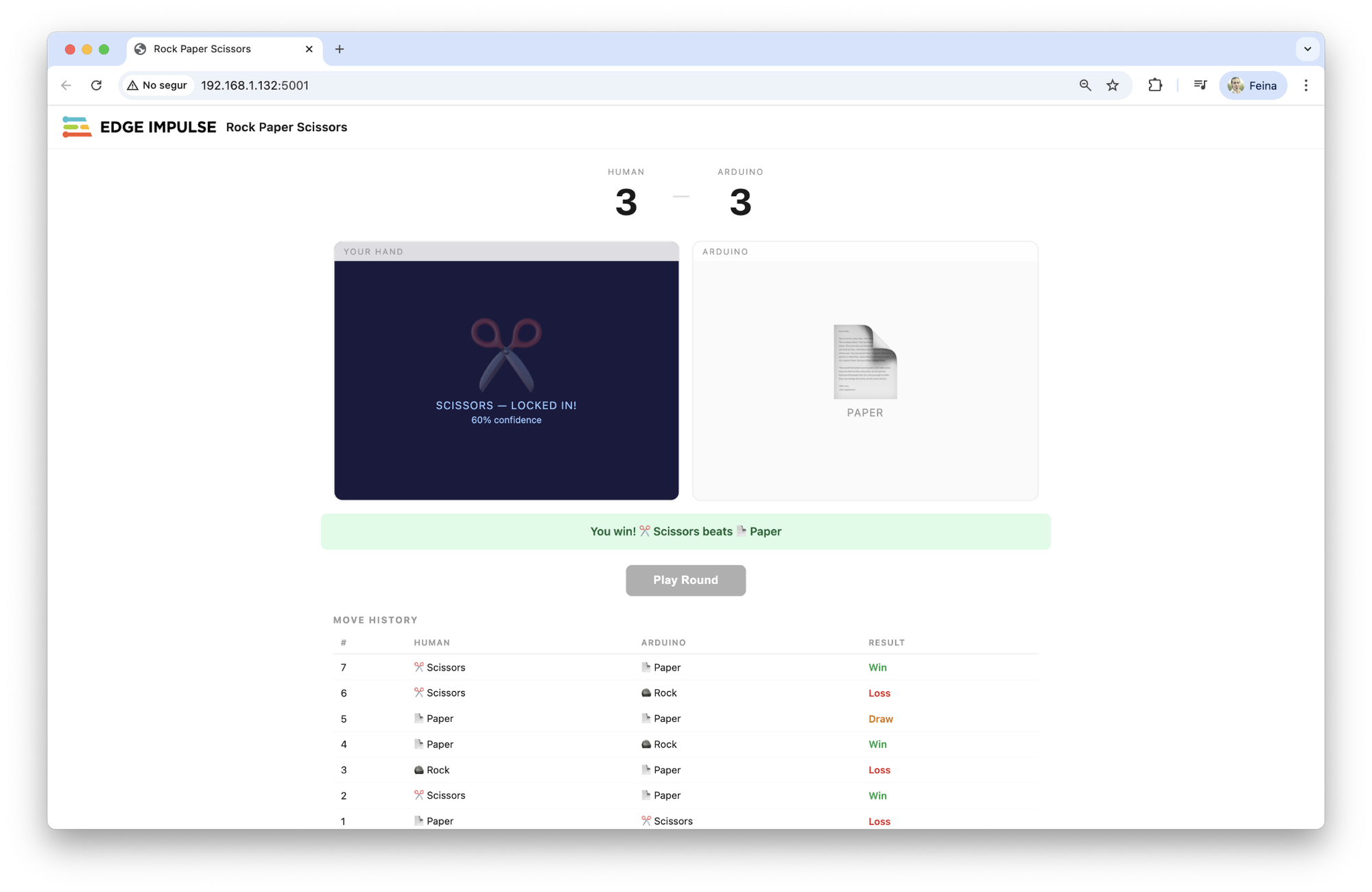
First, I trained this machine learning object detection model using Edge Impulse to detect Rock Paper Scissor. I selected the Arduino UNO Q as the target hardware and deployed it for Arduino UNO Q.
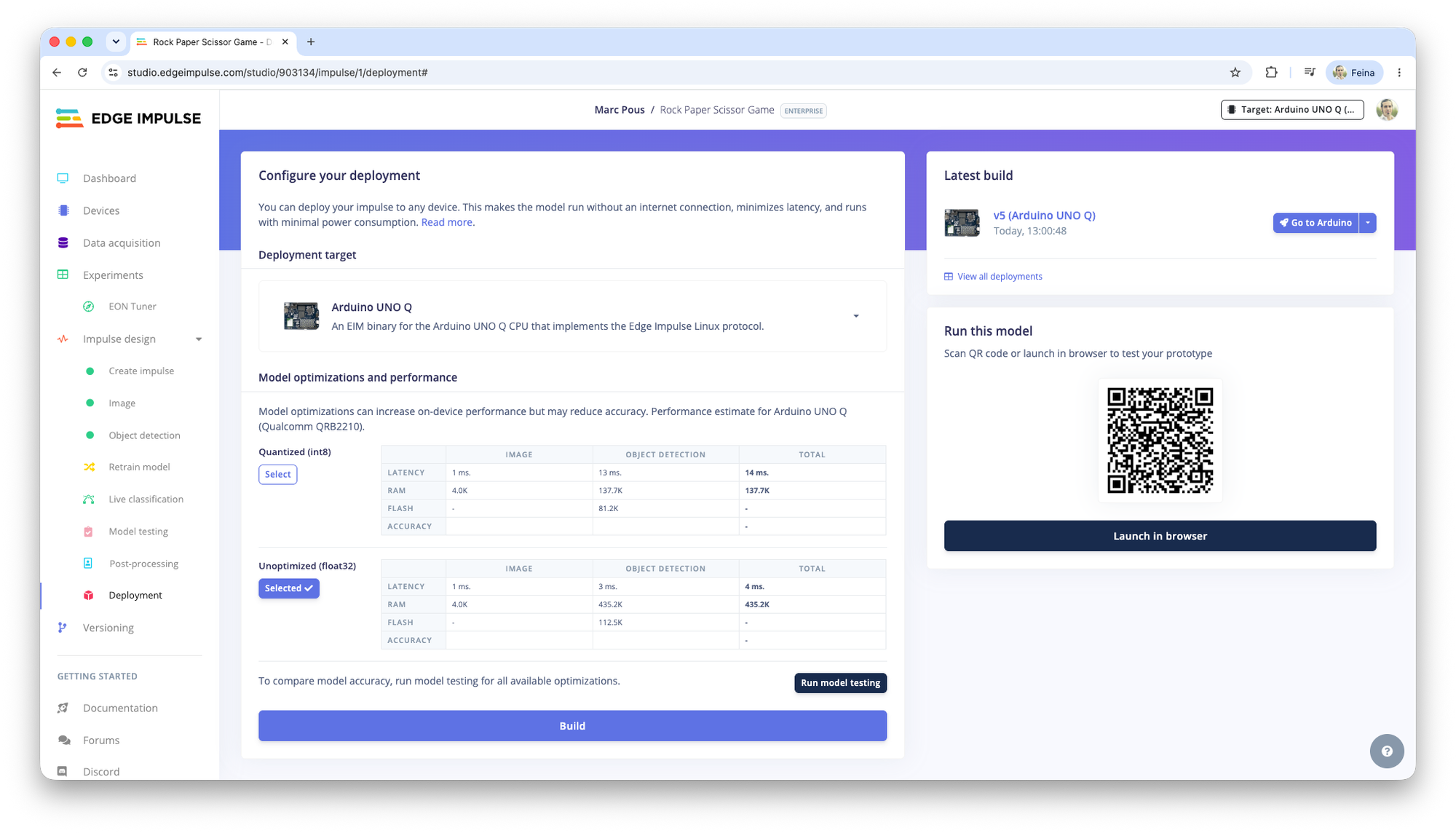
Afterwards, with the UNO Q active, I accessed Claude Code, made sure it had access to my Arduino UNO Q skill, and prompted this command. (Feel free to copy, modify and test yourself):
Build a "Rock-Paper-Scissors" game where a human player competes against the Arduino UNO Q.
- Mechanism: Human movement detection will be handled via the Arduino AppLab brick video object detection feature.
- Model: The system relies on a pre-trained Edge Impulse ML model deployed to the AppLab environment. This model outputs specific labels: rock, paper, or scissors based on the webcam feed processed by the AppLab brick.
- Data Flow: You must implement the logic/interface that captures these classification events as they are emitted by the AppLab video object detection layer and passes them to the web-based game engine.
Game Rules & Mechanics
- Rock beats Scissors
- Scissors beats Paper
- Paper beats Rock
- The "Arduino" move is generated programmatically by the backend to simulate an opponent.
- A single "round" is triggered whenever the AppLab video detection detects a valid gesture from the human. And the human clicks a button to keep that move.
System Architecture & Tech Stack
* The Vision Bridge (AppLab Interface)
- Create the logic to interface with the Arduino AppLab brick's video stream.
- Ensure the backend can listen for and parse the specific strings returned by the Edge Impulse model (rock, paper, or scissors).
* The Game Engine (Backend - Python/Flask or FastAPI)
- Logic: Tracks the current score (Human vs. Arduino) and manages win/loss sequences.
- Persistence: Saves a history of games in a local JSON file (game_history.json) containing timestamps, both moves, and the winner.
- API: Provides an endpoint (or WebSocket) to push real-time updates to the Web UI whenever a new detection occurs.
* The Web UI (Frontend - HTML5/CSS/JS)
- Visuals: A high-impact, dark-mode dashboard representing the "Arena."
- Live View: Large, animated Emojis for both the Human and the Arduino moves during an active round.
- Scoreboard: Persistent counters for total wins for both parties.
- Game Log: A scrollable, real-time feed of previous matches (e.g., "14:02:31 - Rock vs Scissors -> HUMAN WINS").
Implementation Instructions
1. Define the Data Schema: Design how the AppLab detection event and the game score/log will be structured in JSON.
2. Develop the Backend Engine: Write the Python logic to handle move comparison and history logging.
3. Build the Web UI: Create a responsive, modern interface using CSS Grid/Flexbox that feels like a professional gaming dashboard.
4. Simulation Bridge: Since the physical AppLab hardware may not be active during coding, implement a "Debug Mode" where you can simulate incoming rock, paper, or scissors signals via a simple API call to test the UI and logic flow.
Assume the Edge Impulse model is already functional within the AppLab brick's video object detection module. Focus entirely on the integration, game logic, and the web interface.
Be sure to check that the resulting application has all the required files for Arduino UNO Q, such as the app.yaml file. You can move the application to Arduino App Lab using SCP or by importing it directly.
To import the application, open Arduino App Lab, go to My Apps, and create a new app. Then import the generated application from there. After importing, you will see the application listed under My Apps. Click on it to browse the files and add your Machine Learning model through the Video Object Detection brick.
In Arduino App Lab, be sure to be logged in to both your Arduino App Lab account and Edge Impulse account. Select the Video Object Detection brick. In the AI models tab, choose the Rock Paper Scissor Game model. It should appear in the list of available models. If it does not, check that the model has been properly deployed in Edge Impulse Studio. (Learn more about Arduino App Lab + Edge Impulse in our docs.)
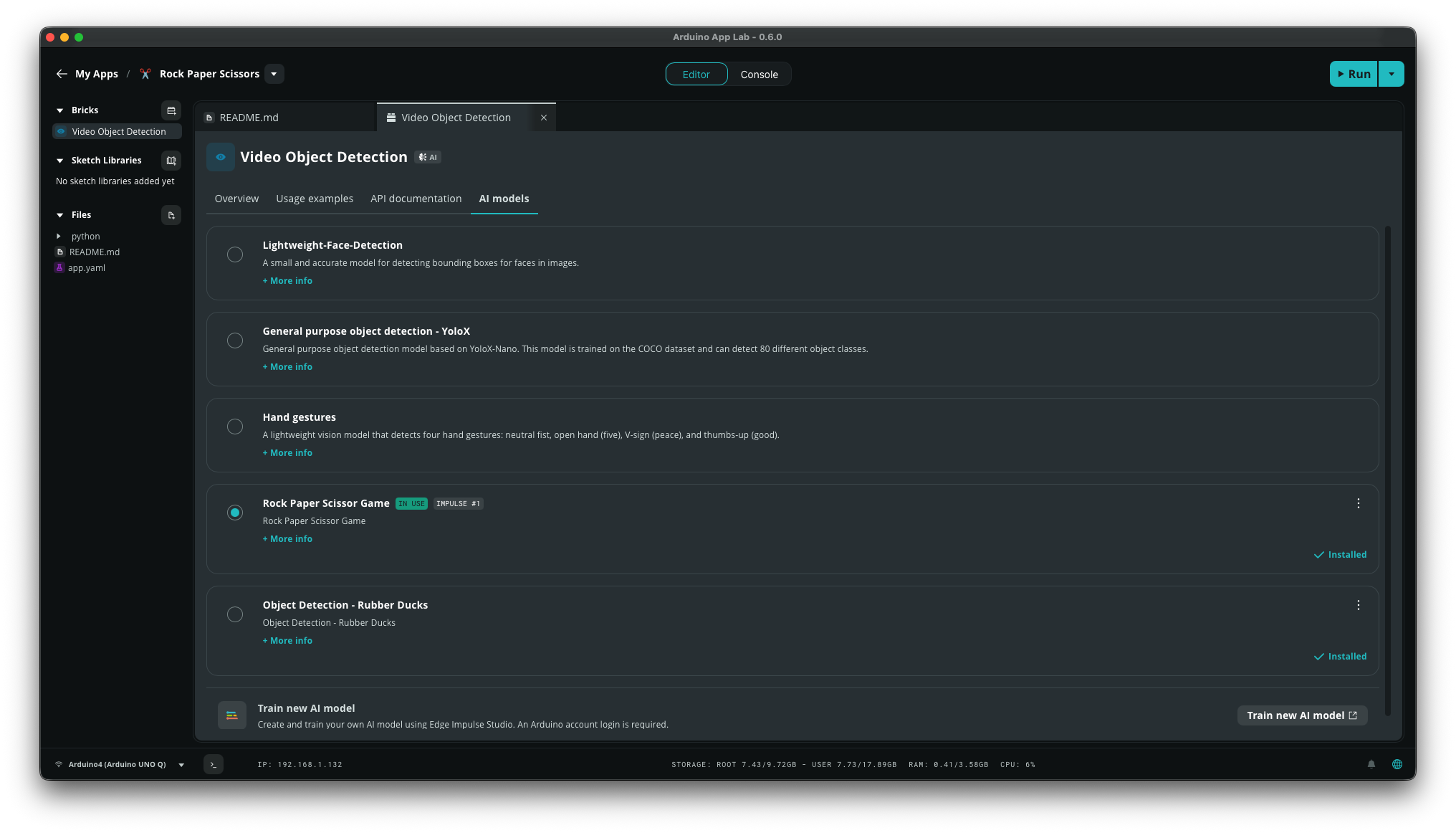
From there click Run to launch it.
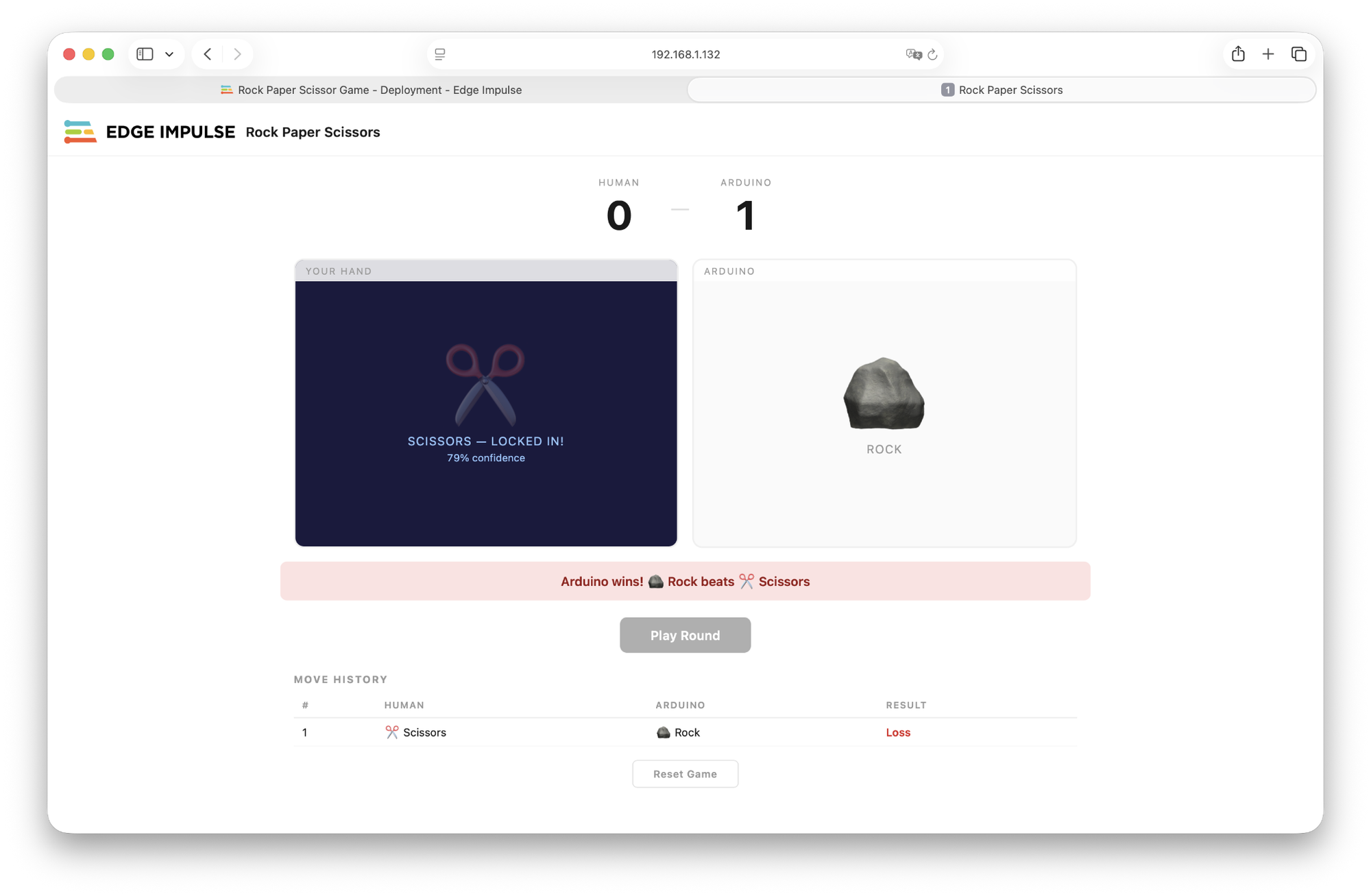
It’s really hard to beat the Arduino!
Try yourself!
Here’s the new reality in 2026: You can go from an idea, train your AI model with Edge Impulse and get a fully functional Arduino application tested in under an hour.
Find here my Arduino UNO Q skill to start testing yourself.
Today, you can validate ideas with real hardware faster and iterate the ML model and application code in real environments in hours instead of weeks.
- Get an Arduino UNO Q
- Create a project in Edge Impulse and train a custom model
- Open Claude Code and start building your application logic
- Deploy the model and the application, test, and iterate!
Your AI agent handles boilerplate, error handling, and best practices. You review, tweak the prompt, and iterate. This dramatically compresses the traditional embedded development cycle.
The future of embedded development isn’t about writing more code, it's about building better things, faster. What remains is the part that was always the point: knowing what to build, and why.