
I clapped twice. The lights went off.
No voice command. No phone. No hub. Just a Galaxy Watch 4 on my wrist, an ML model running on its processor, and a UDP (User Datagram Protocol) packet fired across the local network.
I built it all myself, using Edge Impulse. Here is how it works.
Gesture-controlled smart lights demo using Edge Impulse and a Galaxy watch
The idea
Smartwatches are underrated as gesture remotes. They sit on your wrist, they have an IMU, and — crucially — they are already there when you want to adjust the lights without hunting for your phone. The catch is that getting a custom ML model onto a Wear OS watch is supposed to be painful: ABI mismatches, stripped-down runtimes, JNI boilerplate, toolchains that argue with each other.
Two things in particular are worth calling out:
Capturing training data from a wearable is normally a project in itself. The watch does not expose a USB data port you can plug into a laptop. You have to build a companion app, handle Bluetooth or Wi-Fi transport, and somehow get the samples into whatever format your training pipeline expects. Here, I built a small forwarding app that streams IMU data directly to the Edge Impulse ingestion API — so the watch becomes a first-class data source without any intermediate tooling.
Deploying to a wearable is where most TFLite-based projects stall. Pre-built Android TFLite libraries ship arm64-v8a binaries, but the Galaxy Watch 4 runs a 32-bit armeabi-v7a userspace despite its 64-bit processor. Edge Impulse’s C++ Android deployment sidesteps the problem entirely by exporting TFLite Micro source code alongside the model. CMake compiles everything from scratch targeting whatever ABI you specify. One line in build.gradle.kts:
ndk { abiFilters.add("armeabi-v7a") }
That is the entire ABI configuration. Everything else is handled by the build.
Collecting data
The Galaxy Watch 4 exposes accelerometer and gyroscope data via the standard Android SensorManager API at up to 50 Hz. I built a small data-forwarding app that streamed both sensors over UDP to the Edge Impulse data ingestion endpoint — six channels in total: acc_x, acc_y, acc_z, gyr_x, gyr_y, gyr_z.
I recorded three gesture classes:
- double_clap — two sharp claps
- color_cycle — two quick wrist twists
- idle — wrist at rest, normal movement
About 30 samples per class, two seconds per sample, with each sample containing a single gesture performed once within that window. The whole collection session took roughly 20 minutes.
I created a dedicated application to collect sensor data from the watch and upload it directly to my Edge Impulse project using the project API key. Here is how it works:
Data collection demo using Edge Impulse and a Galaxy watch
You can download the app source from the smartwatch_data_collector repository on GitHub and follow the instructions in the README to add your own project’s API key using the adb command.
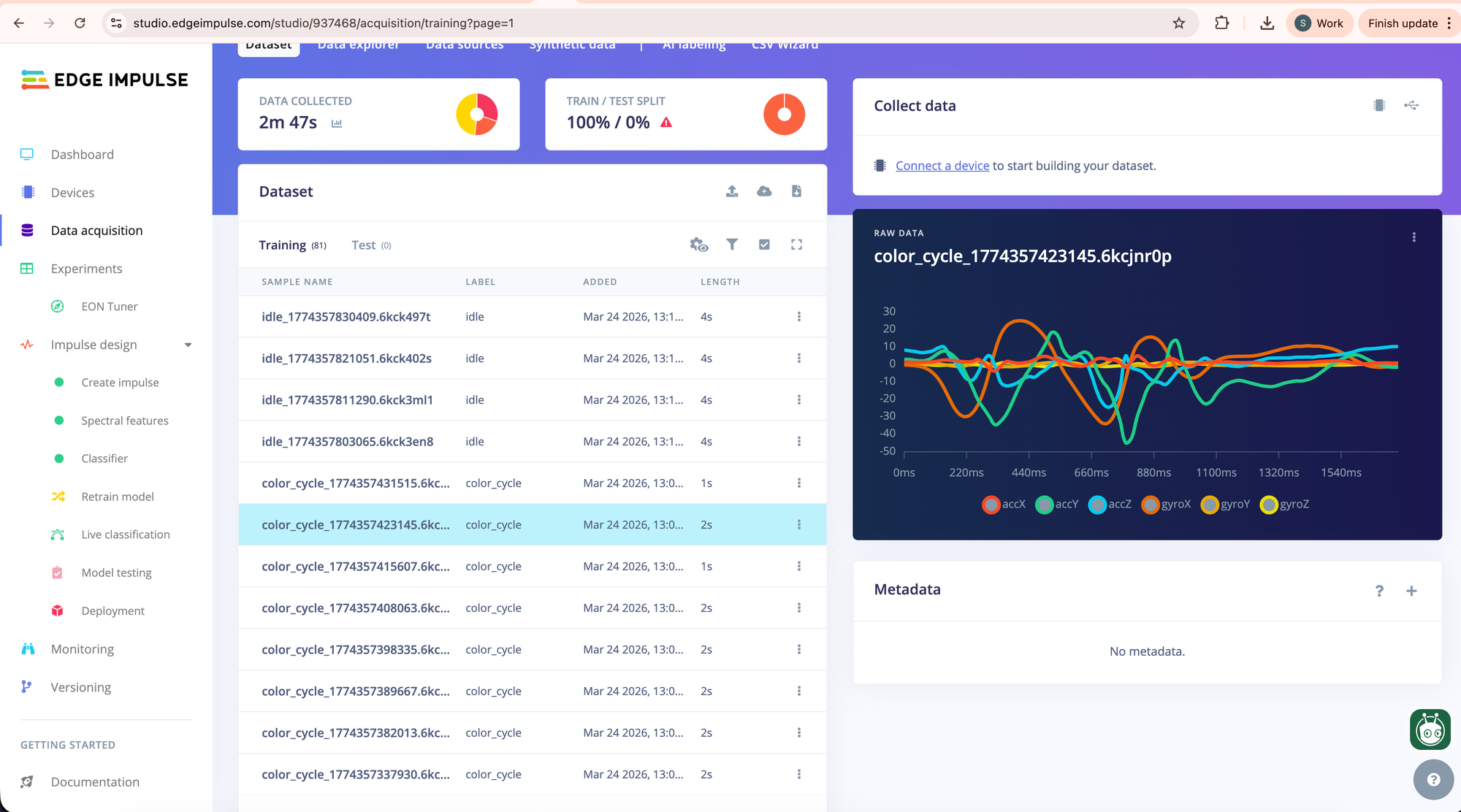
After collection, samples were reviewed and cleaned using Edge Impulse Studio’s sample editor — this involved trimming samples where the gesture started too late or was cut off at the edge of the window, and removing any samples with obvious sensor dropout.
Configuring the impulse
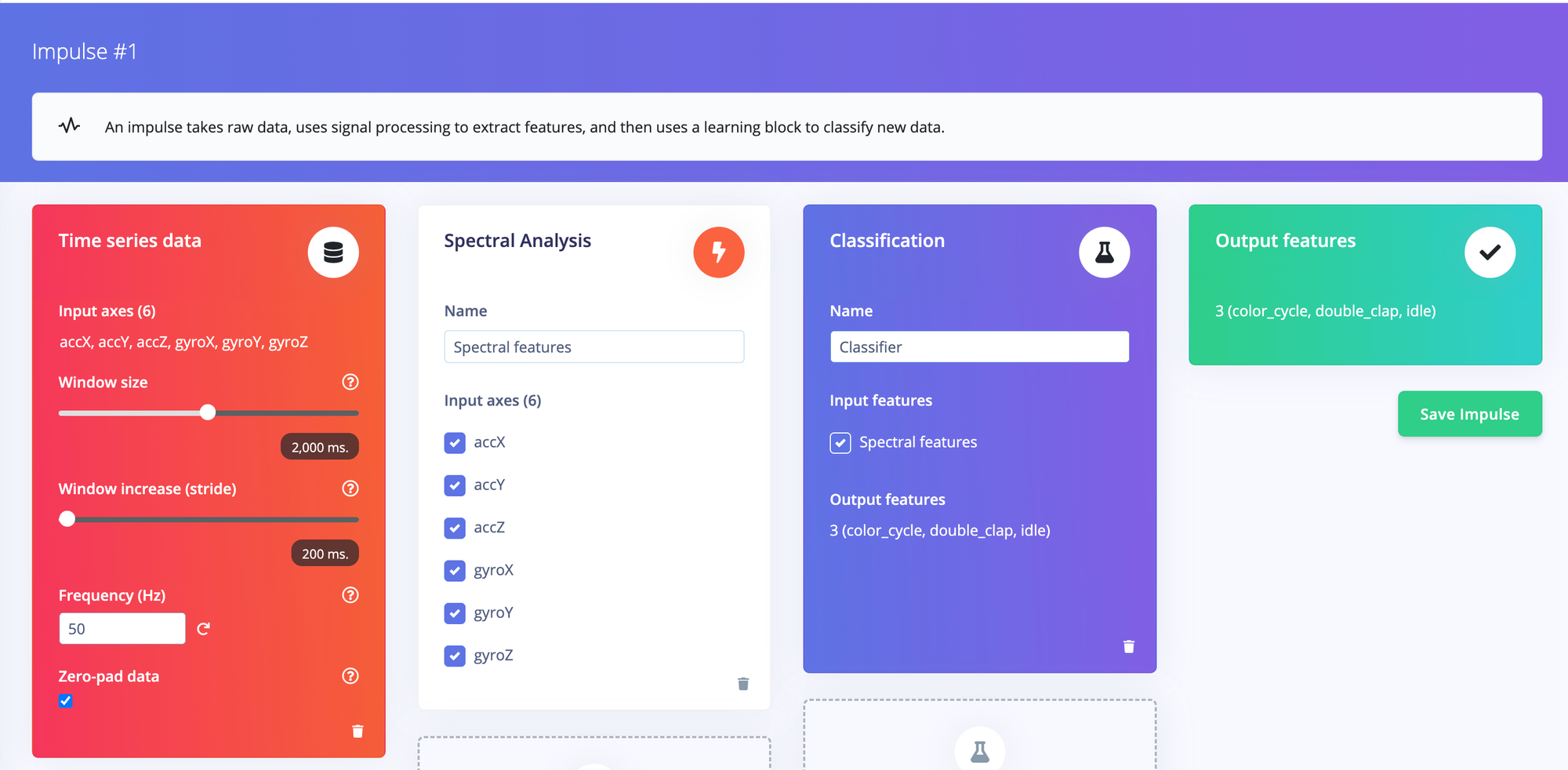
The impulse uses IMU sensor data — accelerometer and gyroscope — as input, with a 2-second window at 50 Hz giving 100 data points per channel. A spectral analysis processing block extracts frequency-domain features from each axis, which are then fed into a small dense neural network classifier.
Extracting features
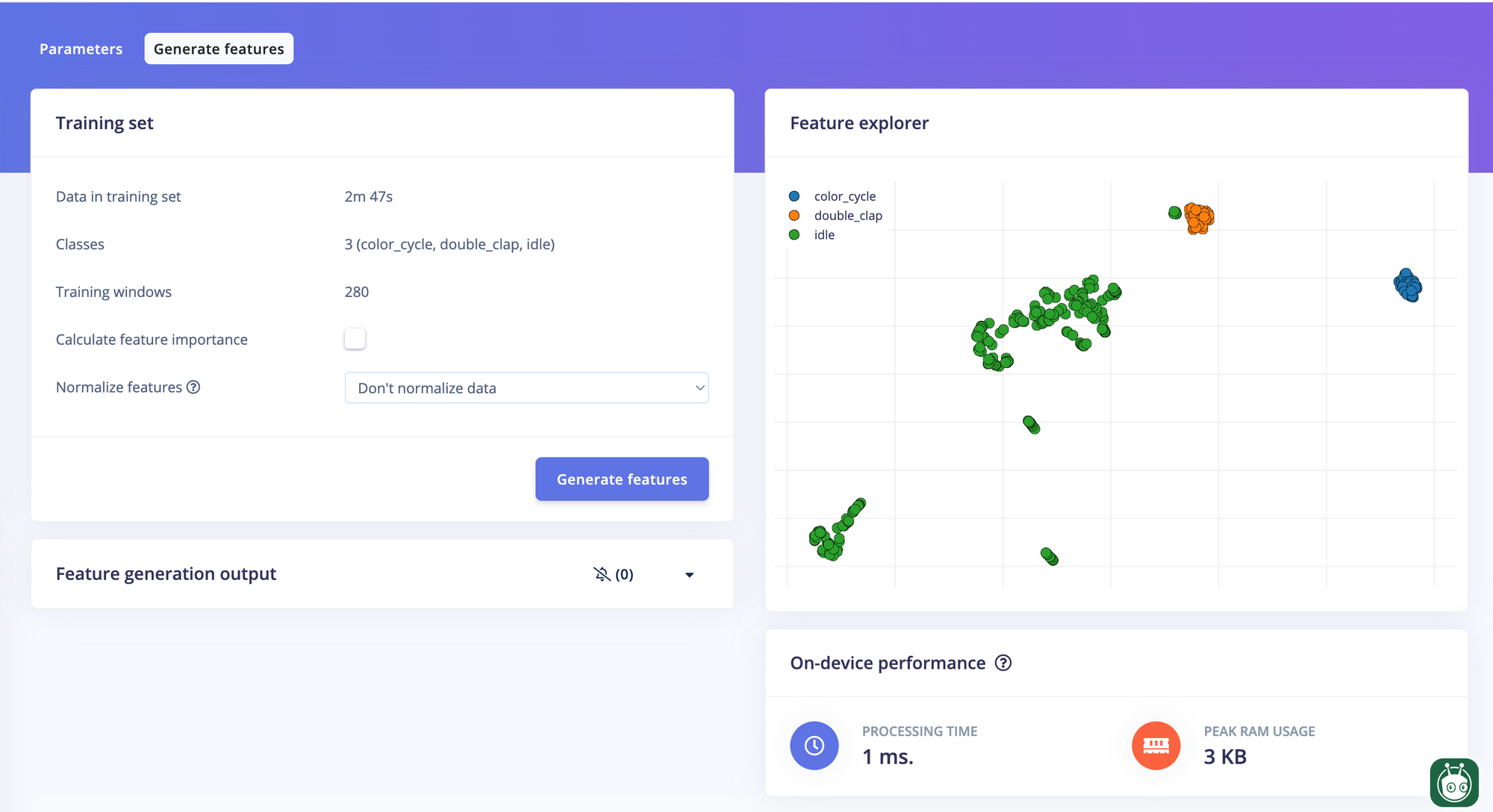
With some fine-tuning of the spectral analysis block parameters, the features for double_clap, color_cycle, and idle became clearly separable in the feature explorer.
Training
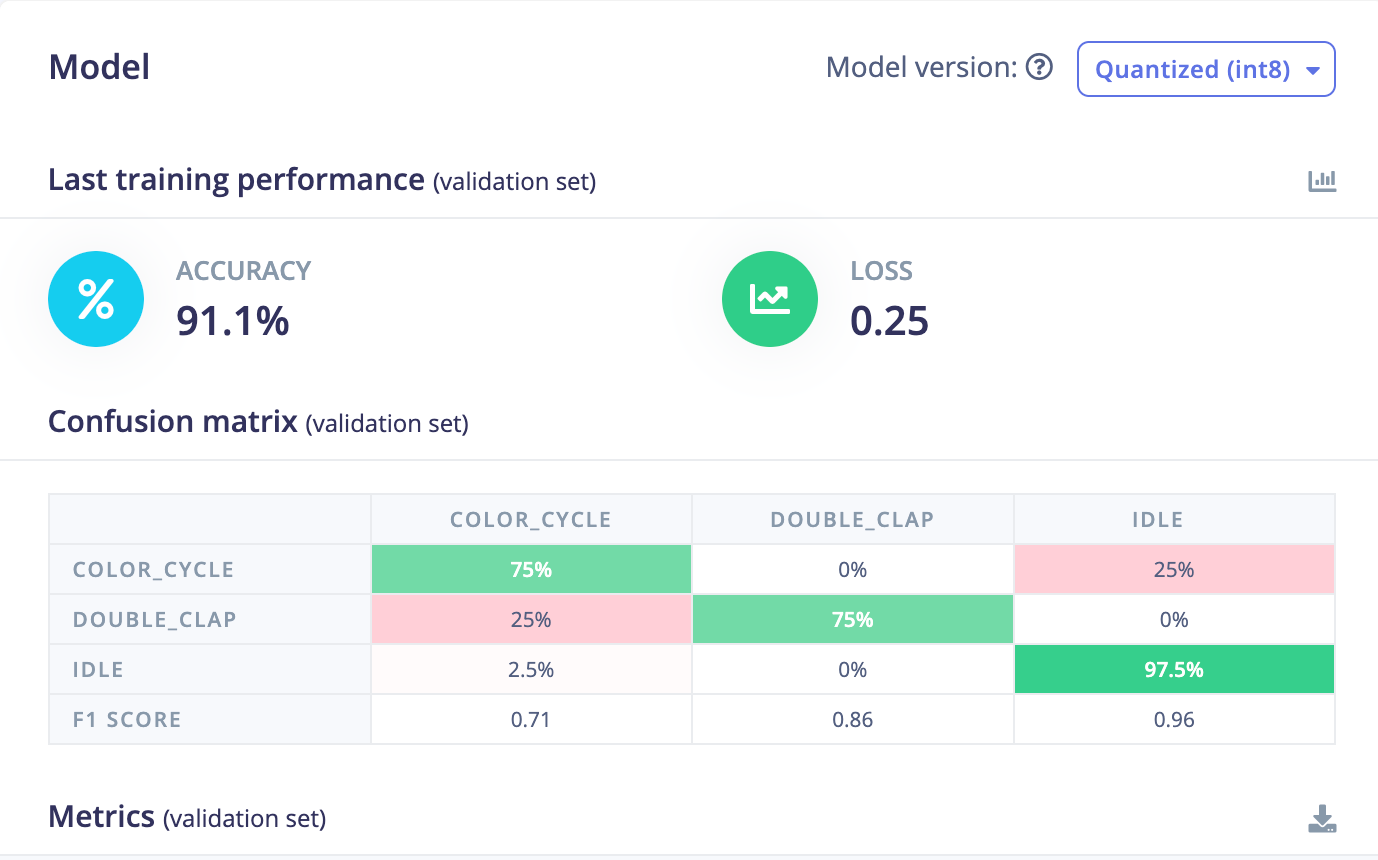
Training is straightforward inside Edge Impulse Studio. After training, I selected the int8 post-training quantized variant to keep the model compact and suitable for on-device inference. Final accuracy on the test set came out at 92%, with most of the misses being due to the limited number of samples in the training dataset.
Wiring it up
The inference pipeline in the watch app runs in two stages.
First, a motion detector monitors the accelerometer variance over a rolling 10-sample window at 50 ms intervals. At rest, variance sits near zero. A gesture spikes it above a threshold almost immediately — no model needed for this step, just arithmetic. This keeps the CPU nearly idle when nothing is happening.
When motion is detected, the app waits one second to let the gesture fully develop, then passes the last two seconds of IMU data to the Edge Impulse classifier via a JNI call:
val result     = runInference(sensorCollector.buildInputArray(featureCount))
val label      = result?.substringBefore(":")
val confidence = result?.substringAfter(":")?.toFloatOrNull() ?: 0f
Results below 65% confidence are discarded. Everything else maps to a smart light command — toggle on/off or color cycle — sent as a UDP packet to the bulb’s local IP.
A partial wake lock keeps the sensor pipeline alive when the screen is off, which is the normal state for a watch.
Results
End-to-end latency from gesture completion to bulb response is around 1.1 seconds — the one-second capture window dominates. That is perfectly comfortable for light control; you are not trying to play a video game.
The model runs reliably across normal daily movement. The variance gate filters out walking and typing almost completely, so false triggers are rare in practice.
What’s next
The obvious improvement is more robust training data — more samples, more variation in wrist angle and movement speed. Beyond that, the same architecture would support scene presets (a slow double-tap for “movie mode”, a Z-motion for “goodnight”), which would make this genuinely useful rather than just a satisfying demo. Furthermore, more devices can be added to demonstrate extended functionalities within a smart home setting.
Want to go deeper? The full source code, including the Edge Impulse deployment, the Wear OS app, and a helper script to swap in a retrained model in one command, is on GitHub in the smartwatch_gesture_control repository.