
Qualcomm's connectivity modules have run on thid-party cores for decades. The Qualcomm QCC74xM family, including the Qualcomm QCC744M, breaks that pattern: it is Qualcomm's first connectivity platform built around a RISC-V core, with a 32-bit RV32IMAFCP MCU running at up to 325 MHz with FPU and DSP support.
Alongside the MCU, the Qualcomm QCC744M is designed with tri-radio connectivity through Wi-Fi 6, Bluetooth® 5.4 wireless technology, and IEEE 802.15.4, with support for Thread and Zigbee-ready applications. The platform is based on the Bouffalo Lab BL61x/BL618 chipset lineage.
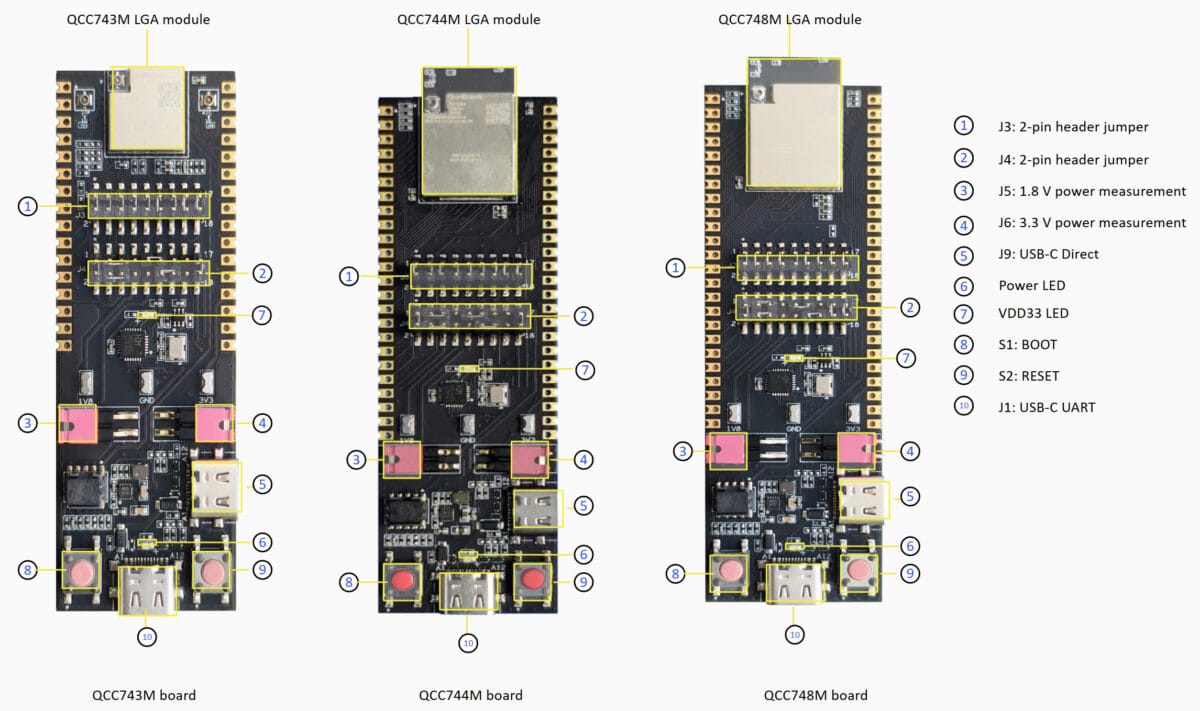
Zephyr already provides upstream board support for the Qualcomm QCC744M-EVK. Today, we're adding Edge Impulse to that stack, so the board can collect sensor data, run machine learning models locally, provide visual status feedback, and respond to physical controls through the Edge Impulse SDK for Zephyr Module & West Extension Commands.
This continues the open source hardware and software work alongside the Zephyr project work we have been pursuing for the last number of years, lead by my colleague embedded engineer Francesco Varani. This qcc744m-evk firmware helps to bring the pieces together.
"The beauty of this firmware is that it takes away the guesswork. With Zephyr pre-configured for the Qualcomm QCC744M-EVK and eval board like the Arduino® Modulino™ Movement already integrated, developers can go from board to inference in minutes. That’s the kind of ease-of-use experience the RISC-V ecosystem needs to grow.” —Francesco Varani
Why use the Qualcomm QCC744M-EVK with Edge Impulse?
The Qualcomm QCC744M-EVK is particularly interesting for compact connected-sensing projects. Wi-Fi 6, Bluetooth 5.4, and IEEE 802.15.4 radios sit alongside Qualcomm Technologies' first connectivity platform built around a RISC-V core, making it possible to combine local sensing and inference with wireless connectivity on one small board.
To demonstrate the Qualcomm QCC744M in actual use, Varani built a reference reference application around a set of Arduino Modulino boards:
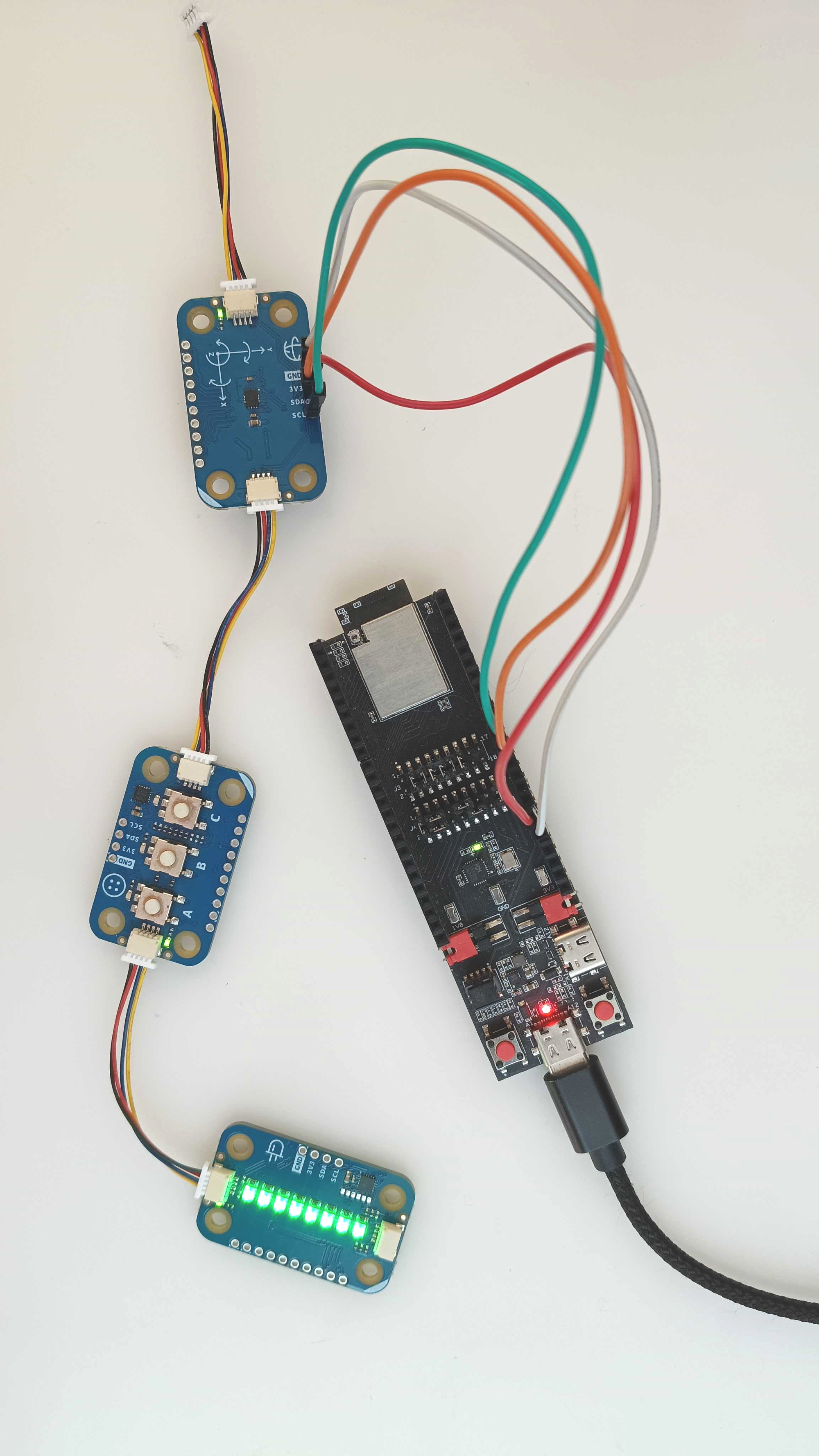
- Modulino Movement provides inertial data to the Edge Impulse model.
- Modulino Pixels provides visual status feedback.
- Modulino Buttons provides physical controls for inference, data forwarding, and sensor selection.
That gives a complete out-of-box reference: motion sensing, status feedback, and physical controls are wired together from the first build. The onboard RGB LEDs can provide real-time feedback without a terminal, and the buttons keep the main workflow available during a demo. It is RISC-V on a connectivity-first platform, built on upstream Zephyr board support and the Edge Impulse Zephyr SDK.
The firmware is open source, so you can fork it and adapt the application for your own sensors, models, and hardware.
Reference design overview:
Qualcomm Technologies' first RISC-V connectivity platform
The Qualcomm QCC744M-EVK is designed with a 32-bit RV32IMAFCP MCU with FPU and DSP support and a tri-radio connectivity platform. It is based on the Bouffalo Lab BL61x/BL618 chipset lineage, which has already been used across connected embedded applications.
Motion sensing with Arduino Modulino
The Modulino Movement board connects to the Qualcomm QCC744M-EVK over I2C. With connections for power, ground, SDA, and SCL, the board can provide real inertial data for an Edge Impulse project.
Status feedback without a terminal
The Modulino Pixels board can provide visual feedback while the application is running:
| State | Colour |
|---|---|
| Idle | Green |
| Inference running | Yellow |
| Data forwarder using the IMU | Blue |
| Data forwarder using the ADC | Magenta |
The LEDs make it possible to see what the device is doing without keeping a serial terminal open.
Physical controls
The Modulino Buttons board keeps the main workflow available without a laptop:
| Button | Action |
|---|---|
| A | Toggle inference |
| B | Toggle the data forwarder |
| C | Cycle between the IMU and ADC |
Button A starts or stops inference. Button B starts or stops data forwarding. Button C switches the active data source between the Modulino Movement IMU and the onboard ADC.
Serial AT commands
The physical controls have serial equivalents, so the same workflow is available from a terminal or the Edge Impulse CLI.
The firmware accepts the following commands over the serial console:
| Command | Action |
|---|---|
AT+RUNIMPULSE | Run the impulse once |
AT+RUNIMPULSECONT | Run the impulse continuously |
AT+RUNIMPULSEDEBUG | Run the impulse with debug output |
AT+STARTDATAFWD | Start streaming sensor data |
AT+STOPDATAFWD | Stop data forwarding |
b | Stop an active inference run |
The command examples are:
AT+RUNIMPULSE
AT+RUNIMPULSECONT
AT+RUNIMPULSEDEBUG
AT+STARTDATAFWD
AT+STOPDATAFWD
When inference is running continuously, send b to stop the active inference and return to the idle state.
The active sensor can be changed with Button C, switching between the Modulino Movement IMU and the onboard ADC. Button B, or AT+STARTDATAFWD and AT+STOPDATAFWD, controls the data-forwarder mode.
The standard Edge Impulse command-line tools work with the firmware as well:
edge-impulse-run-impulseand:
edge-impulse-data-forwarderGet started in five minutes
Initialize the firmware workspace with west:
west init -m https://github.com/edgeimpulse/firmware-qc-qcc744m-evk qcc744m-workspace
cd qcc744m-workspace/firmware-qc-qcc744m-evk
west update
This fetches Zephyr RTOS, the Edge Impulse Zephyr SDK module, and the remaining project dependencies.
In Edge Impulse Studio, create or open a project and go to:
Deployment -> Zephyr library -> Build
Extract the generated library into the firmware's model/ directory. Then build the application:
west build --pristine -b qcc744m_evkPut the board into download mode by holding BOOT, tapping RESET, and then releasing BOOT.
The firmware can then be flashed using the project's flashing script:
./flash.sh --allboot2The --allboot2 option flashes the bootloader and application image. The bootloader only needs to be flashed once per board. After that, use:
./flash.shfor subsequent application updates.
For an alternative Windows flashing workflow, use Qualcomm's QConn Flash utility from the Qualcomm QCC74x SDK.
Built for real hardware, not just a demo
The status feedback is a small detail, but it changes how the board feels to use. Instead of checking a terminal after every interaction, the Modulino Pixels board shows the current state immediately:
- Green means the application is idle.
- Yellow means inference is running.
- Blue means the data forwarder is streaming IMU data.
- Magenta means the data forwarder is streaming ADC data.
The Modulino Buttons board provides the matching physical workflow:
- Button A starts or stops inference.
- Button B starts or stops data forwarding.
- Button C changes the active data source between the IMU and ADC.
For scripted or remote operation, the serial interface provides the same core controls:
AT+RUNIMPULSE
AT+RUNIMPULSECONT
AT+RUNIMPULSEDEBUG
AT+STARTDATAFWD
AT+STOPDATAFWD
Send b to stop an active continuous inference run.
That combination of inference, feedback, and control turns the Qualcomm QCC744M-EVK from an architecture-support checkbox into a device that can be handed to someone at a table demo and used without constant terminal interaction.
Debugging with VS Code
The project also includes VS Code configurations for the Microsoft C/C++ extension and Cortex-Debug. Pressing F5 builds the application, launches OpenOCD, attaches GDB, and breaks at main.
This makes it possible to move from a working demonstration to firmware development without replacing the project's build and debug workflow.
Get involved
The firmware-qc-qcc744m-evk project is open source under the BSD-3-Clause license. Fork it, swap in your own model, and adapt it for your own sensors and boards, RISC-V or otherwise. Also check out our other Zephyr Module blogs and content
What comes next
With the Qualcomm QCC744M-EVK, Zephyr, and Edge Impulse in place, you can build connected-sensing applications such as:
- Gesture and activity recognition
- Wearable motion sensing
- Asset tracking
- Local anomaly detection
- Sensor-triggered wireless devices
The important part is that inference does not need to wait for a cloud connection. The Qualcomm QCC744M can collect data, run the model locally, provide immediate feedback through the Modulino Pixels board, and connect to the physical world through the Modulino Movement and Buttons boards.
This is what makes the platform interesting: Qualcomm Technologies' first connectivity platform built around a RISC-V core, running Edge Impulse and Zephyr, and equipped with the hardware and software components needed to support development of a complete device rather than a board-level demonstration.
Get started with a free Edge Impulse developer account and see what you can build with the Qualcomm QCC744M-EVK and Zephyr.